CxFmsNodeChooserCtrl Example
Use the CxFmsNodeChooserCtrl object to display and manipulate an ActiveX CygNet FMS Node Chooser Control in a CygNet Studio screen environment.
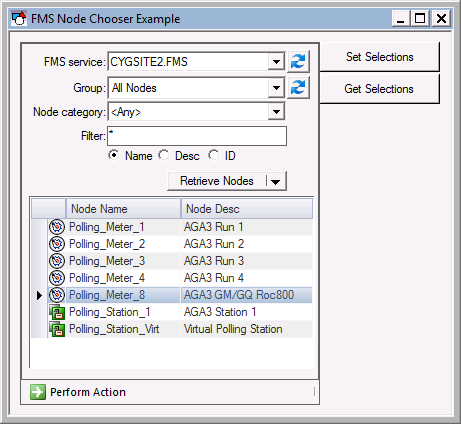
|
| CygNet FMS Node Chooser Control Example |
To see an example FMS Node Chooser control implemented in a pre-designed screen, open the FMS Node Chooser Ctrl.csf file found in the APPS SCREXAMP or in the CygNet\Clients\CStudio\Screens\Examples folder.
CygNet Studio Screen Script: FMS Node Chooser Ctrl.csf
Copy
CxFmsNodeChooserCtrl Example
Sub btnGetSelections_EventClick()
Dim This : Set This = btnGetSelections
Dim arySelected
arySelected = FmsNodeChooser.GetNodeSelection()
Dim i, strMsg
For i = 0 To UBound(arySelected)
strMsg = strMsg & arySelected(i) & Vbcr
Next
MsgBox strMsg
End Sub
Sub btnSetSelections_EventClick()
Dim This : Set This = btnSetSelections
Dim aryNodes
Redim aryNodes(1)
aryNodes(0) = "2540"
aryNodes(1) = "2541"
FmsNodeChooser.SetNodeSelection aryNodes
End Sub
Sub FmsNodeChooser_EventUpdated()
Dim This : Set This = FmsNodeChooser
Dim arySelected
arySelected = FmsNodeChooser.GetNodeSelection()
If UBound(arySelected) > 0 Then
MsgBox "Can only select one Node as the Session Node"
Elseif UBound(arySelected) = 0 Then
MsgBox arySelected(0) & " set as the Session Node"
'add script here to set Session Node
Else
MsgBox "You must select a Node first"
End If
End Sub

